A task can finish late without moving the project’s finish date. Another task can slip by one day and move the entire delivery. The difference lies in the dependency network and the time available before the delay reaches a critical milestone.
DNA’s project experience includes a Gantt chart, linked tasks and critical-path visibility. Reading that chart well starts with understanding what its relationships mean.
A bar is not a dependency
Two tasks drawn next to each other are not necessarily linked. Define the actual relationship: what must finish or start before the next activity can proceed? Include the appropriate calendar and any agreed delay between activities.
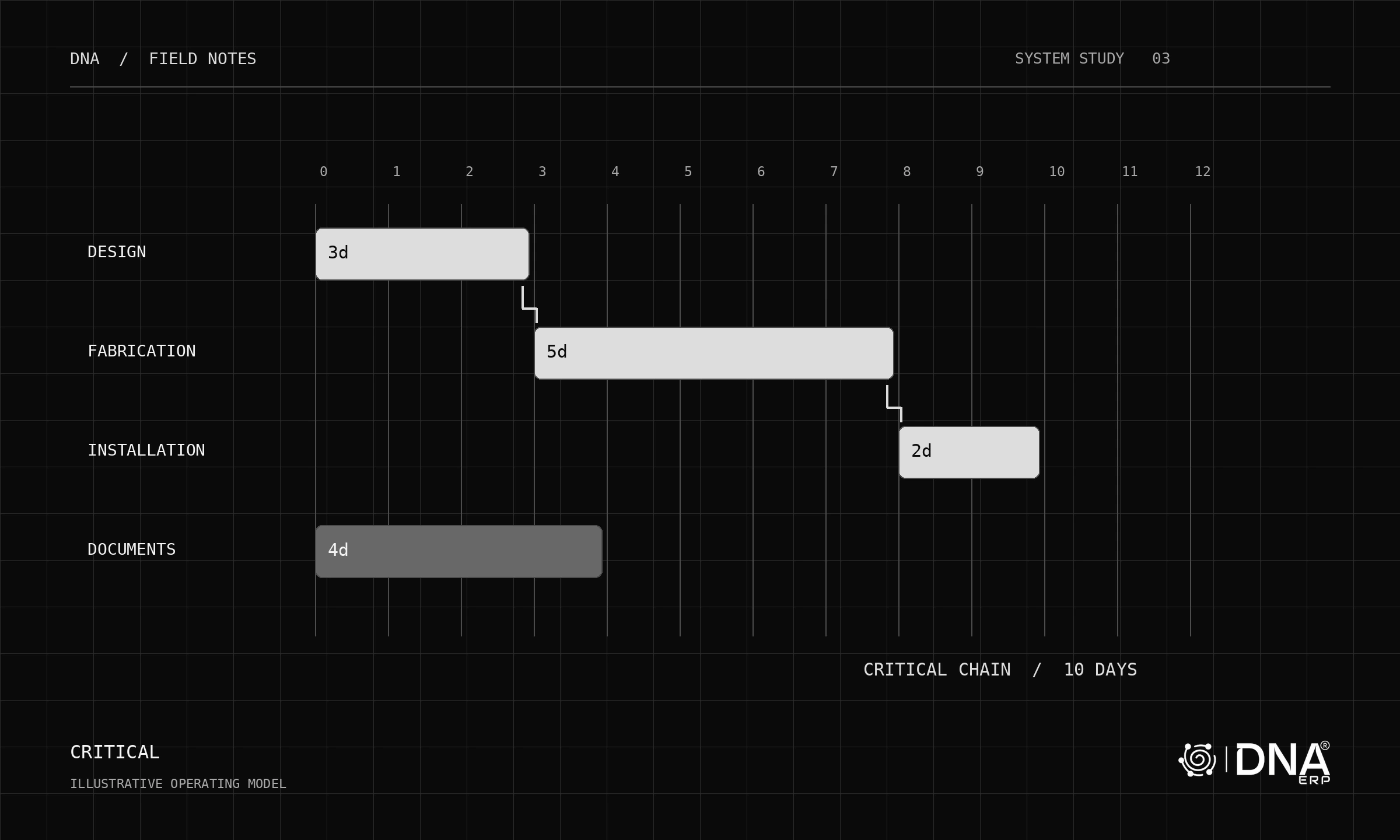
For a simple illustrative finish-to-start chain, design takes three days, fabrication five and installation two. With no overlap or gaps, the chain takes ten days. If fabrication grows by two days, installation must move and the chain becomes twelve days.
Look for the parallel path
Suppose document preparation runs independently for four days while that ten-day chain proceeds. A two-day delay in the document task may have no effect on the finish, assuming both paths only need to meet at the end. It uses some of the available float instead.
This is why moving every task whenever one date changes would be wrong. Linked successors should respond according to their dependencies and constraints. Independent tasks should remain independently planned unless a resource or other real constraint connects them.
Recalculate after change
The critical path can change. Extending a previously shorter branch may make it the controlling path. Review the recalculated network after a drag or duration change rather than assuming yesterday’s critical tasks remain critical.
Actual dates, fixed milestones, calendars and resource constraints can complicate the result. The interactive example here deliberately uses a small finish-to-start network with whole-day durations so the logic remains visible; it is not a full scheduling engine.
Test DNA with a meaningful scenario
In Projects & Tasks, move a linked task, inspect its successors, then change an independent task. Check the critical path and milestone position after each change. Connect commercial consequences to Budget & Cost Centers where relevant.
A useful schedule makes the consequence of a change understandable before the team commits to it.